Use case · Talking head
Talking-head videos, without the ums.
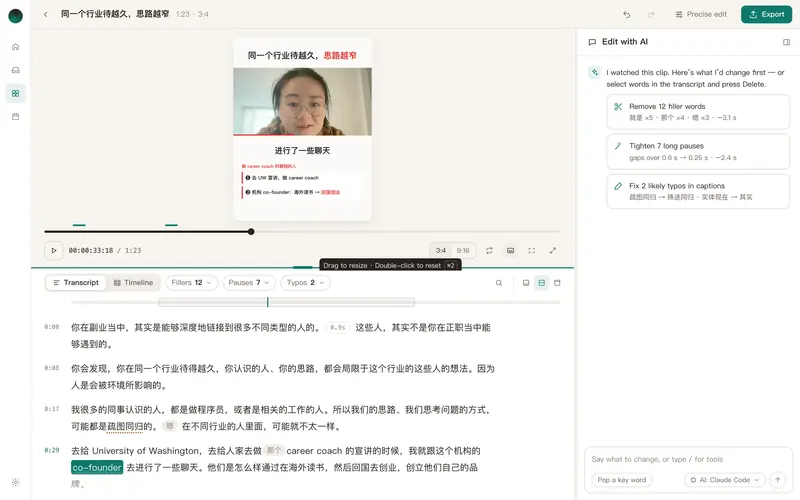
Reelfold finds the pauses, filler words, repeats and restarts in a talking-head recording. Clear ones are cut on word boundaries; the ones it isn’t sure about are listed for you to keep or cut. Then come captions, punch-ins, a cover and one export per platform.
macOS app coming soon · MIT licensed · works today as a Claude Code skill
Cleanup you can trust
Cuts on word boundaries
Every cut lands between words and on an exact frame, so no syllable is clipped.
You confirm the unsure ones
Uncertain cuts come as a short list with the words before and after. Reply “cut 3, 5, keep 7”, or tick boxes in the app.
Checked after cutting
The audio is transcribed again after cleanup to make sure no content word was lost.
Three strengths
Gentle, standard or tight. Pick per video, or set a default per client.
What happens to one recording
Clean up speech
Pauses, fillers, repeats and restarts are found and sorted into sure and unsure.
Tighten the pace
An optional speed-up with pitch kept, so the video feels brisk without sounding rushed.
Add the layer on top
Captions, punch-ins, pop words, a notes panel and a progress bar, styled the same across a series.
Cover and copy
A cover for each platform’s size and post copy within each platform’s limits.
Questions
Questions, answered plainly.
Does it handle Chinese filler words?
Yes. It knows common fillers in Chinese (such as 就是, 然后, 那个) and English, and you can add your own words per client.
Can I edit by transcript?
Yes. The clip editor shows the transcript with fillers and pauses marked, and you can cut a range by selecting words.
Will it change what I said?
Cuts only remove time. Caption corrections that are guesses are marked so a person checks them; the audio itself is never rewritten.
Related
Clean up your next take.
Free and open source. Your video stays on your Mac.
macOS app coming soon · MIT licensed · works today as a Claude Code skill