

Vlog
Cette page n’est pas encore traduite : voici la version anglaise.
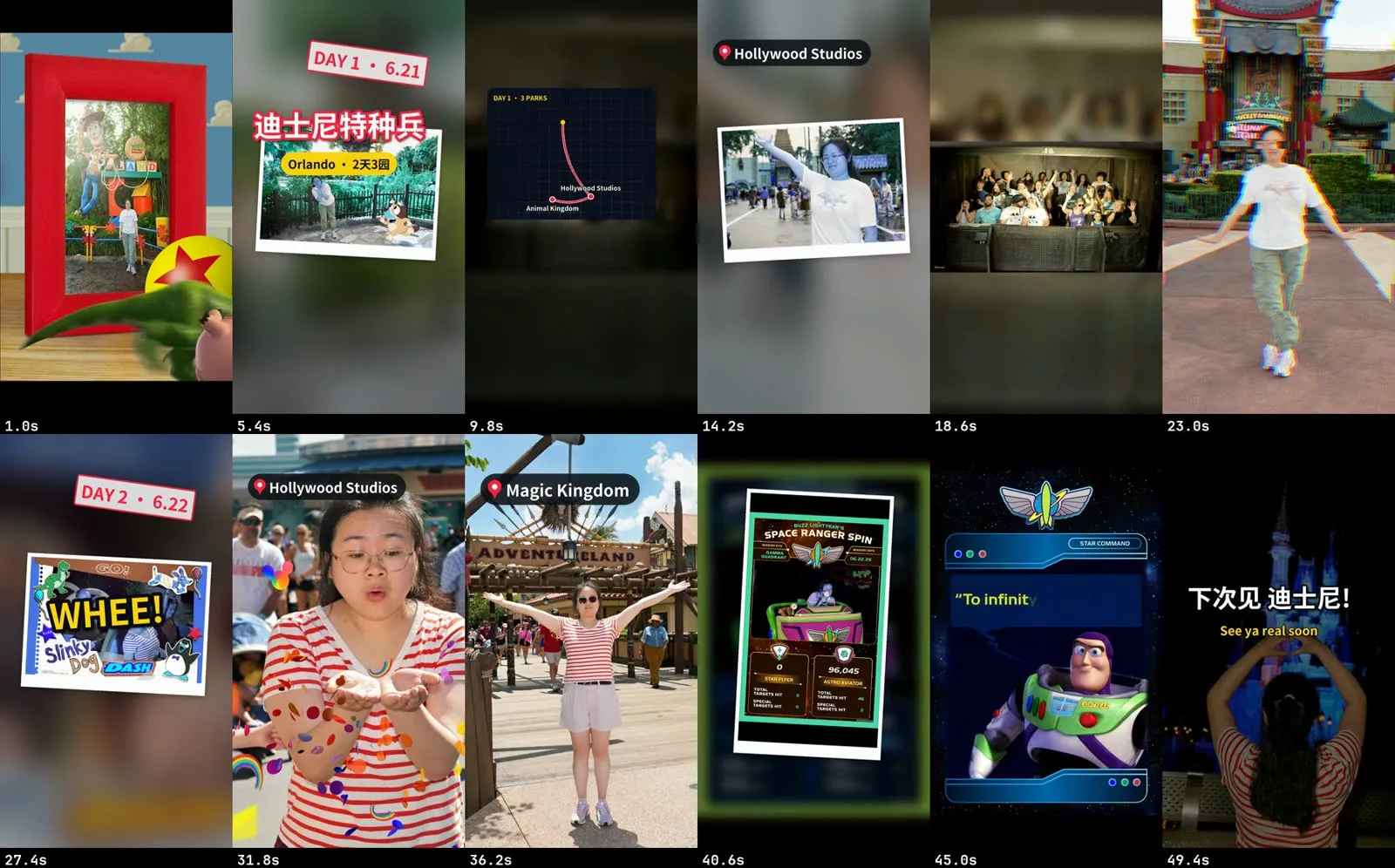
You get one polished vlog from a pile of clips: either calm (graded, gently sped up, long crossfades, music laid underneath) or fun (cut to the beat, speed ramps and slow-mo, whips, text pops, a route map, sound effects, and your talking-to-camera bits captioned over a ducked music bed). Both come with a cover.
Pick a style
Section titled “Pick a style”| Calm | Fun | |
|---|---|---|
| Feel | Slow crossfades, long holds, ambience, music laid on after | Cut to the beat, speed ramps, whips, text pops, sound effects |
| Footage | Drone, nature, walks; long smooth takes | Trips with many places, people, food, action; 60/120 fps clips; photos |
| Sound | Silent or ambient master, music added on top | Music-led: bed, sound effects, and speech clips with the music ducked under them |
| Length | 1 to 5 minutes, often horizontal 4K | 20 to 90 seconds, vertical first, also YouTube |
| Say | “calm”, “cinematic”, “slow”, “healing” | “beat-cut”, “fast”, “fun travel reel” |
Before you start
Section titled “Before you start”- Your clips, any size, landscape or portrait, SDR or iPhone HDR, 24 to 120 fps. Photos work too, mostly in the fun style.
- For fun: a music track with a clear beat that you have the rights to.
- For calm: a vibe for the music in your own words. Reelfold can fetch a CC BY track and writes the credit line you paste into the post.
- Places and days, if you want location tags, day stamps or a map.
If the video is mostly you talking, use Talking-head shorts instead. A few talking-to-camera clips in a vlog are fine.
In the Mac app
Section titled “In the Mac app”- On Home, describe the vlog and add the clips. Say calm or fun and the platform.
- The plan shows the style, the platform and the title.
- Windows and pacing. Reelfold makes contact sheets of every clip (one tile every 4 seconds) so nothing is edited blind. The good windows, the order, the music, the title and the map go into one edit list. Ask the agent to draft it, then adjust.
- The batch renders on your Mac. For the fun style it also writes a report: every cut with its beat check, transitions, overlays, the sound effects cue sheet and loudness.
- Pick the cover.
- Review and publish.
With the Claude Code skill
Section titled “With the Claude Code skill”Hand Claude the footage folder and say calm or fun. The skill follows workflows/vlog: it probes every clip, reads the contact sheets, writes work/edit.json, and renders. For fun it does a dry run first so you can read the plan.
python3 $VSTUDIO/workflows/vlog/scripts/probe.py footage/* --init work/edit.json --style fun \ --music music/track.mp3 --platform xiaohongshu:fullpython3 $VSTUDIO/workflows/vlog/scripts/build_fun.py work/edit.json --dry-runWhat each style does
Section titled “What each style does”Calm. HDR clips tone-mapped, a gentle grade, a speed per segment (scenery a little faster than subject shots), stabilise where it’s shaky, crossfades with no black first frame and a fade-out at the end. Music is looped to fit, faded and normalised; with ambient sound kept, the place’s sound sits under the music. The cover is a torn-paper scrapbook collage.
Fun. The music is analysed first and every cut lands on a whole beat. The edit opens on a hook of the best moments, then a title pop, then your shots in order, with a whip at each new place or day and a cut exactly on the music drop, then an accelerating finale and a slow outro. On top:
- speed ramps, true slow-mo from 120 fps clips, freeze-frames into a photo card;
- transitions: whip, zoom punch, flash, light leak, glitch (once), or a straight cut on the beat by default;
- text: title pop, location tags, DAY stamps, date stamps, word pops, a route map card, an end card, all inside the platform’s safe area and never overlapping;
- sound effects (synthesised, nothing to license): whooshes on whips, impacts on drops, a riser into the finale, shutters on photos;
- speech clips: kept at 1×, cleaned of hesitations and long pauses, captioned, with the music ducked under them.
A version without music ships too, as a stem for re-scoring.
Options worth knowing
Section titled “Options worth knowing”| Option | Style | What it does |
|---|---|---|
| Platform | both | Sets canvas, fps, safe area, caption box and loudness. Default 小红书 9:16. |
| Grade, brightness | both | “Too dark” raises brightness, never adds a vignette. |
| Segment speed | calm | Per segment; persona defaults for subject and scenery shots. |
| Pace | fun | fast or relaxed (double length). |
| Music start, drops | fun | Where the music starts, and where the big cuts land. |
| Map, title, end card, word pops | fun | Turn each on or off. |
| Sound effects | fun | On by default; sfx: false turns them off. |
| Music level, duck amount | fun | Lower the bed, or duck it harder under speech. |
| Speech cleanup | both | Fun: gentle, automatic edits only by default. Calm: opt-in per segment. |
Example prompts
Section titled “Example prompts”- “Cut these drone clips into a calm 3-minute 4K vlog with soft music and a cover.”
- “Fun travel reel for Xiaohongshu from this Tokyo trip, cut to this track. Add a map of the cities and a DAY stamp for each day.”
- “Slow-mo the jump at the beach and put a whip into the night market.”
- “Too fast. Make it relaxed and turn the music down under my talking bits.”